If you sold shares, funds, or ETFs in an HL Fund and Share Account, FiscalFox can calculate the UK capital gains from your transaction history. Start with the Capital Account Transaction Summary CSV. It contains the dated buys, sells, fees, and proceeds needed for HMRC share matching.
How to download your Hargreaves Lansdown transaction history
The CGT calculation requires one download: the Capital Account Transaction Summary CSV. HL also offers a separate Income CSV for dividends and interest, but that file is optional and cannot replace the Capital Account trade history.
One required file, one optional file
Required for CGT: Capital Account Transaction Summary CSV. Optional for income context: Income CSV. It adds dividend and interest information but does not replace the Capital Account trade history.
- Do not upload Portfolio Summary, valuation, tax certificate, PDF, or Excel files for CGT trades.
- Use enough Capital Account history to cover the original purchases behind shares you sold.
- Keep the tax certificate for income-tax records and cross-checking.
Official context: GOV.UK publishes the SA108 capital gains summary and HMRC's HS284 shares and CGT helpsheet.
Capital Account download, required for CGT
- Log in to your Hargreaves Lansdown account at hl.co.uk.
- Select your Fund and Share Account, then open Transaction History.
- Choose Capital Account, not Income, Portfolio Summary, or valuation.
- Set the date range from your earliest relevant purchase through to 5 May after the completed tax year ends. This includes purchases within 30 days of year-end sales; the report still covers only the selected year.
- Download the file titled Transaction Summary in CSV format.
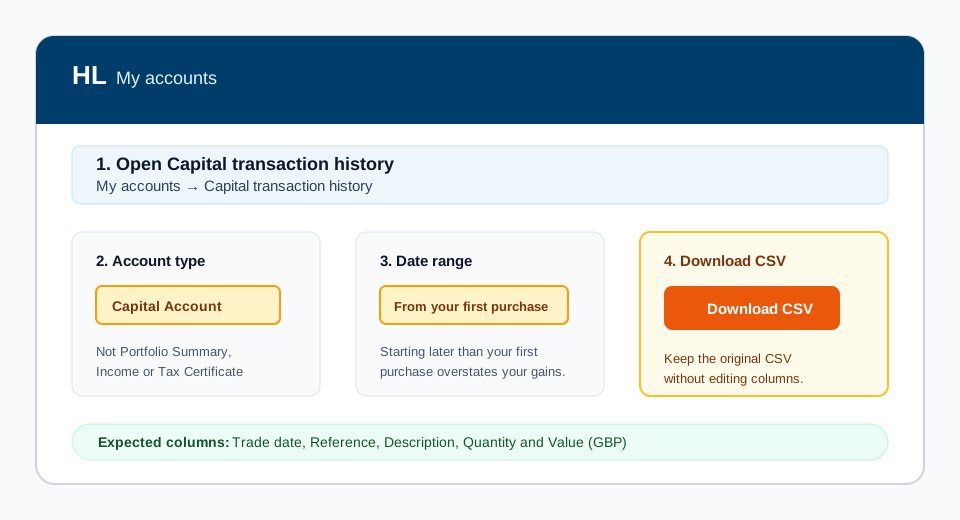
Set the start date to your earliest purchase, not the start of the tax year
HL defaults to a recent date range. If you sold something you bought before that date, the export contains the sale but not the purchase. FiscalFox then has no acquisition cost to deduct, so the gain looks far larger than it really is.
Missing acquisition history is the most common reason an HL calculation needs review. If you are unsure when you first bought a holding, set the start date earlier than you think you need.
Income download, optional
- Return to your Fund and Share Account overview.
- Click on Income (sometimes listed under the account sub-menu or as "Loyalty Bonus / Income").
- Set the same date range as above.
- Click Download CSV to export your dividend and income data.
- Save the .csv file to your computer.
Once you have the Capital Account CSV, open the FiscalFox calculator with Hargreaves Lansdown already selected and upload it. Add the Income CSV only if you want FiscalFox to include dividends and interest in the summary.
Have the Capital Account CSV?
HL will already be selected. Upload the file and review your calculation for free.
Why your HL tax certificate does not solve CGT
The Hargreaves Lansdown tax certificate is mainly an income document. It helps with dividends, interest, and other income entries for Self Assessment, but it is not the same as a full capital gains computation for listed shares, funds, and ETFs. HL's adviser centre says it cannot calculate capital gains. Our broker records guide compares HL's documents with those from Interactive Brokers and Trading 212.
For CGT you need the disposal proceeds, allowable acquisition costs, dealing costs, and the UK share matching rules applied in the right order. That means the same-day rule, the 30-day rule, and the Section 104 pool before you copy figures into the SA108 capital gains pages.
Quick FAQ for HL investors
Does HL tax certificate include CGT?
Usually no. Treat it as an income-tax document, not as the complete CGT computation for your Fund and Share Account.
What do I need instead?
Download the Capital Account CSV so each taxable disposal can be matched to the correct acquisition cost. If you want income context in the FiscalFox report, download the Income CSV as well.
When does SA108 come in?
SA108 is the capital gains summary that sits behind Self Assessment. Enter SA108 figures after your HL transactions have been matched and summarised, not by copying a portfolio gain or income certificate.
File format details
Hargreaves Lansdown exports transaction data as CSV (comma-separated values) files. The Capital Account CSV typically contains:
- Trade Date -- the date the deal was executed
- Settlement Date -- the date the transaction settled
- Reference -- HL's internal deal reference number
- Transaction Type -- described as "Deal" for buy/sell transactions
- Description -- details of the stock or fund, including buy/sell direction
- Units/Shares -- the quantity traded
- Price -- the execution price per unit
- Value -- the total transaction amount in GBP
- Charges -- dealing fees and stamp duty where applicable
The Income CSV contains dividend payments, loyalty bonus credits, and interest. FiscalFox uses this to provide a complete picture of your investment activity, though dividends are reported separately under income tax rather than CGT.
How FiscalFox processes your HL data
When you upload your Hargreaves Lansdown files, FiscalFox applies the full set of HMRC share matching rules in the legally required order:
- Same-day rule -- shares sold on the same day as a purchase of the same security are matched first. The actual cost from that same-day acquisition is used to calculate the gain.
- 30-day bed and breakfast rule -- if you sell a holding and repurchase the same security within the following 30 days, the disposal is matched against that repurchase. This prevents the artificial crystallisation of losses.
- Section 104 pool -- any remaining shares sold are matched against the pooled average cost basis, which FiscalFox calculates and maintains from your full transaction history.
FiscalFox combines data from both the Capital Account and Income CSV files into a unified timeline. The output includes a detailed disposal-by-disposal breakdown, the matching rule applied to each sale, and a summary of total gains, losses, and the resulting CGT liability for the tax year.
Common issues with Hargreaves Lansdown files
Missing acquisition history is the most common problem
This is the issue we see more than any other. If your export starts after you bought a holding, FiscalFox sees the disposal with no matching purchase and cannot work out the acquisition cost. The calculation flags the disposal for review rather than guessing, because a missing cost would inflate your gain and overstate the tax you owe.
The fix is to re-export the Capital Account CSV with the start date set to your earliest purchase. If you transferred holdings in from another broker or registrar, HL will not hold that earlier history at all, so you will need those records from the previous provider. See the Section 104 pool guide for why the full purchase history matters.
For transfers into HL, use the export instructions for your previous provider: AJ Bell, Fidelity UK, Saxo or Vanguard. Add the earlier history alongside your HL file.
The Income file is optional for CGT
The Capital Account CSV is enough to calculate capital gains from HL trades. The Income CSV adds dividends and interest to the wider summary, but uploading it by itself will not provide the buy and sell rows needed for CGT.
Portfolio Summary is not transaction history
Portfolio Summary, holdings, and valuation exports show what you own at a point in time. They do not contain the dated Capital Account buys and sells needed for same-day matching, the 30-day rule, and the Section 104 pool. Return to Transaction History and download the Capital Account Transaction Summary CSV instead.
HL uses "Deal" terminology
Hargreaves Lansdown labels buy and sell transactions as "Deals" rather than using the more common "Buy" or "Sell" labels. The direction (buy or sell) is typically embedded in the description field. FiscalFox parses this automatically and correctly identifies the transaction direction, so no manual editing of the CSV is required.
Multiple account types
If you hold investments in both an ISA and a Fund and Share Account with HL, make sure you download data only from the Fund and Share Account. ISA transactions are not subject to CGT. HL keeps these accounts separate in its interface, so selecting the correct account before downloading should prevent any mix-up.
Accumulation funds and ERI
Some funds and ETFs can also create income-tax reporting work, especially offshore reporting funds with excess reportable income. ERI is separate from the CGT disposal calculation, but amounts already taxed as income may affect your CGT base cost. See the ERI guide if your HL holdings include accumulation ETFs or offshore reporting funds outside an ISA or SIPP.
Supported transaction types
FiscalFox extracts and processes the following transaction types from your Hargreaves Lansdown files:
| Transaction Type | How FiscalFox Uses It |
|---|---|
| Buy (Deal) | Added to the Section 104 pool for the relevant security |
| Sell (Deal) | Matched against acquisitions using HMRC rules to calculate gain or loss |
| Dividend | Recorded for reference (taxed under income tax, not CGT) |
| Loyalty Bonus | Recorded for reference as additional income |
| Charges/Fees | Included as allowable costs that reduce your taxable gain on disposals |
Hargreaves Lansdown is one of the most commonly used brokers by FiscalFox users. If you encounter any unusual transaction types or formatting issues in your HL files, please contact our support team and we will help resolve the issue.
Frequently asked questions
Does HL tax certificate include CGT?
Usually no. The Hargreaves Lansdown tax certificate is mainly an income-tax document for dividends and interest. Capital gains tax normally needs a separate transaction-level calculation using your buys, sells, allowable costs, and HMRC share matching rules.
Which Hargreaves Lansdown files do I need for FiscalFox?
For CGT, download your HL Capital Account CSV for buy and sell transactions. If you also want income context in your report, download the Income CSV and upload both files together.
Do I enter my HL tax certificate figures on SA108?
Not for the share and fund CGT computation by itself. SA108 needs disposal proceeds, allowable costs, gains, losses, and supporting computations. The HL tax certificate can still be useful for income sections of Self Assessment.
Can I use the gain shown by Hargreaves Lansdown for HMRC?
A platform gain or performance figure is not always the HMRC capital gains figure. UK CGT needs same-day matching, the 30-day rule, Section 104 pooling, allowable costs, and any relevant history across taxable holdings.
What if I transferred holdings into or out of Hargreaves Lansdown?
Transfers can make the calculation harder because the HL export may not include the original acquisition history. You should keep records from the old broker or registrar so the Section 104 pool can be calculated correctly.
Official UK tax references
This guide is checked against published GOV.UK and HMRC material. FiscalFox is a calculation tool, not personal tax advice; review unusual transactions with a qualified adviser.